June 12, 2026
Ask GPT about this Blog Ask GPT about this Blog
Crypto Payments for WooCommerce in 2026: The 6 Best Gateways, Honestly Ranked
Here is the short answer: the best crypto payment gateway for your WooCommerce store in 2026 is the one whose custody model matches how much you trust a third party with your money. Everything else, the fees, the coin count, the checkout polish, is secondary to one question that quietly decides the rest: when a payment lands, who is holding it, and can they stop you from getting it?
This guide ranks six gateways merchants actually compare, with the good and the bad for each, a side-by-side table, and a clear way to choose. We include PayRam (that's us) and we will tell you exactly where the others beat it. A comparison where one option wins every row is an advertisement, not a guide.
The one decision that ranks them all: custody
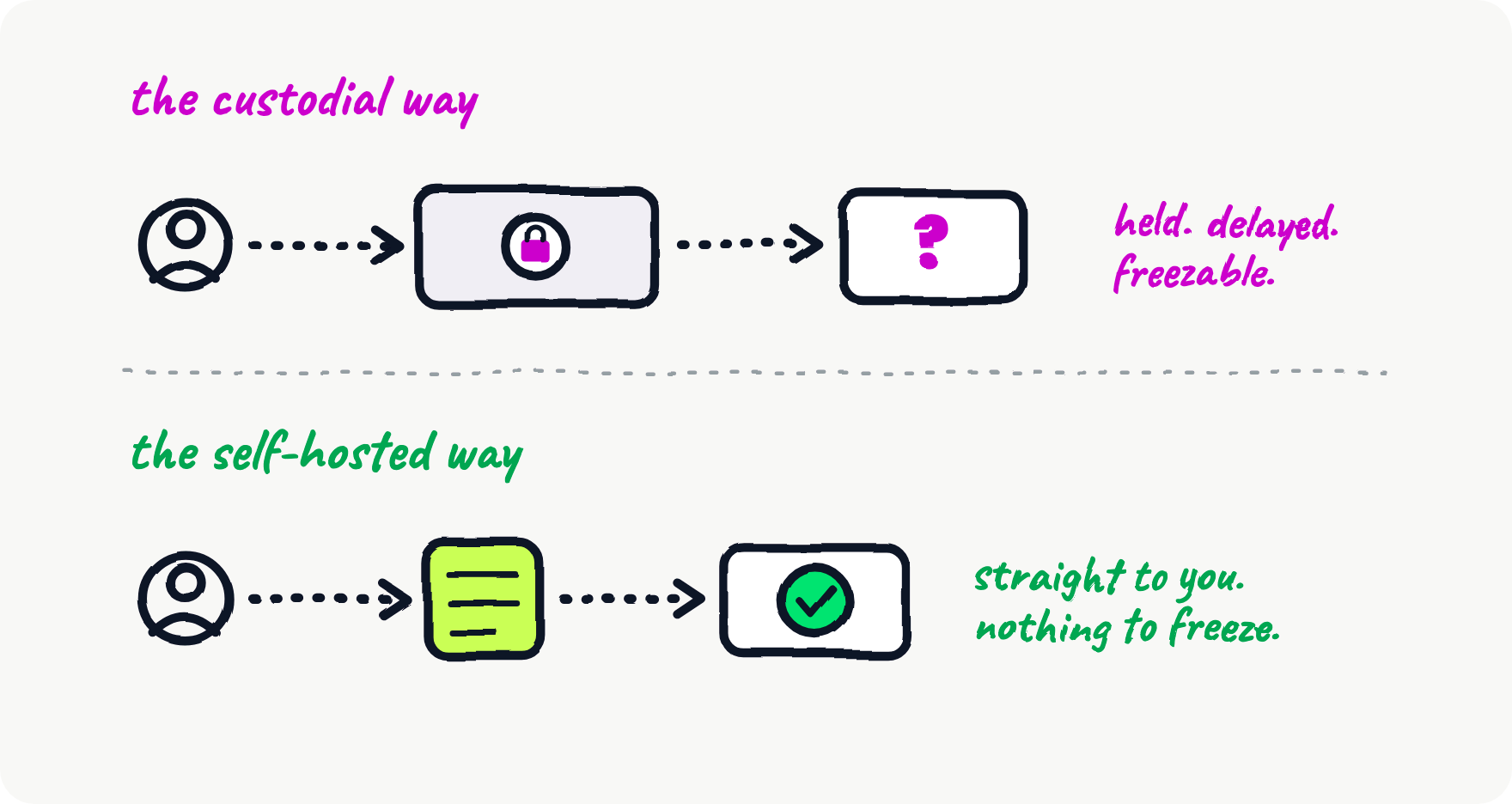
Crypto WooCommerce gateways split into two families, and the split matters more than any feature list.
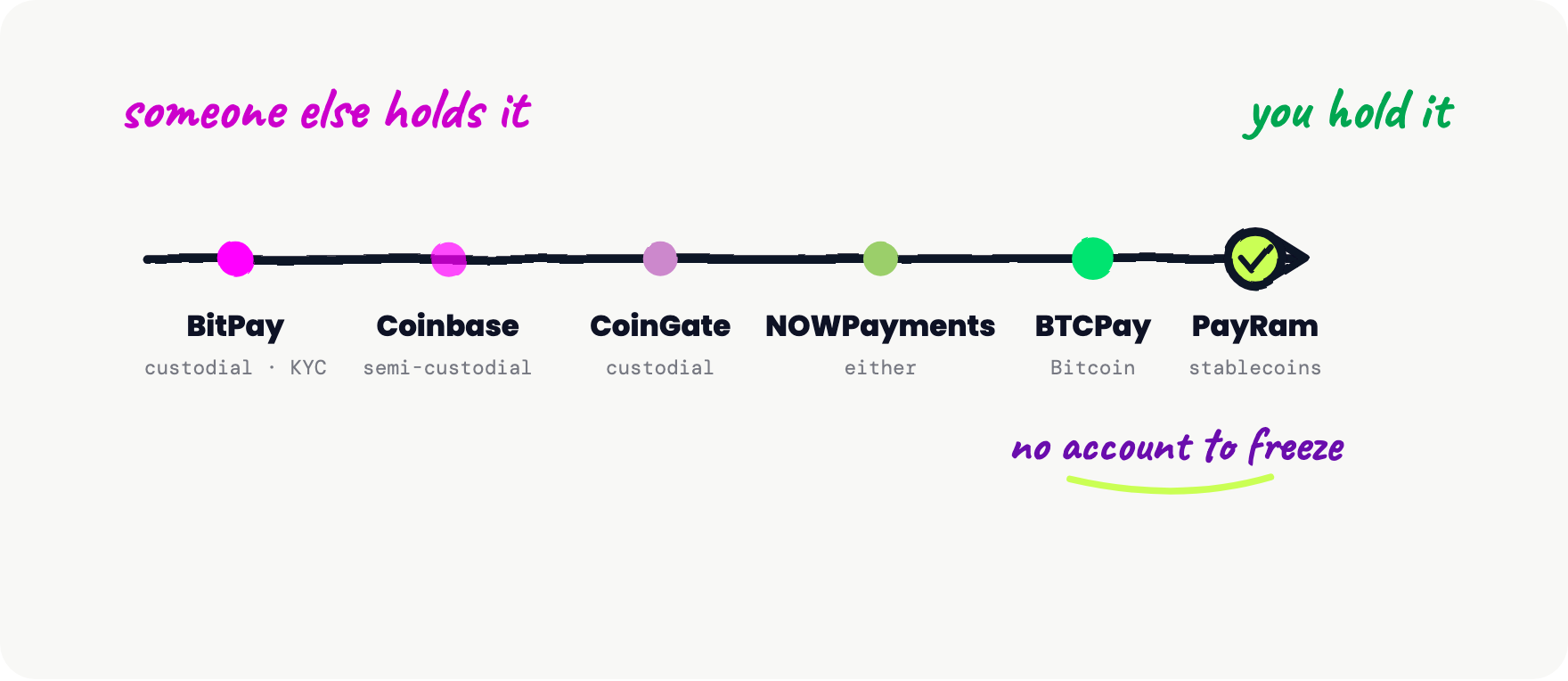
Custodial gateways (BitPay, Coinbase Commerce, CoinGate) receive your customer's payment into their infrastructure, hold it, and forward it to you later, often after converting to fiat. This buys you convenience: fiat settlement to a bank account, compliance handled, volatility absorbed. It costs you control. There is an account, that account can be reviewed, frozen, or closed, and the gateway sees every transaction and customer.
Non-custodial and self-hosted gateways (BTCPay Server, PayRam, and the non-custodial mode of some others) send funds straight from the customer's wallet to yours. No middleman holds the money, so no middleman can freeze it. The trade is that you take on a little more setup and your own compliance decisions. On-chain settlement also kills chargebacks outright: once a payment confirms, there is no bank to reverse it, which removes the $15 to $25 chargeback fee that custodial card rails quietly pass to merchants.
If you have ever watched a processor freeze an account or seen an exchange go insolvent, non-custodial is not a preference, it is a requirement. Here is the full field, placed by how much control you keep.
1. PayRam — best for stores that never want to be frozen
PayRam is a self-hosted, self-custody, stablecoin-first payment gateway. You run it on your own server (a $20 to $150/month VPS), connect it to WooCommerce with a free plugin, and payments settle straight into your wallet in USDT, USDC, and other major assets. Because it is your server, there is no PayRam account to lock, no custodian holding funds, and your order and customer data never leaves your infrastructure. Deposit keys are never stored on the server: a family of smart contracts moves funds directly on-chain, so a hacked store is not a drained treasury.
The good: True self-custody plus self-hosting, the only gateway here combining both with a stablecoin-first focus. No account locks, no fund freezes, no monitoring or reporting, no KYB to start. Payouts, a real dashboard, card-to-crypto for customers without crypto, and a multi-merchant operator mode are all in the same install.
The bad: You run a server, so it is not a two-click hosted signup. It does not settle to a bank account in fiat (it is crypto-native by design). The current WooCommerce plugin sends amounts in USD, so set your store currency to USD for now. If you want someone else to hold the money and handle compliance for you, that is the opposite of what PayRam is.
Best for: high-risk and deplatformed merchants, privacy-conscious stores, and anyone who treats "my account got frozen" as an unacceptable outcome rather than a rare one.
2. BTCPay Server — best for Bitcoin maximalists who want zero fees
BTCPay Server is the original self-hosted gateway and an open-source institution. It charges zero processing fees (you pay only your server), it is non-custodial, and its WooCommerce plugin is widely regarded as one of the best-maintained in the WordPress ecosystem. Lightning Network support makes small Bitcoin payments practical.
The good: 0% fees, complete sovereignty, battle-tested, excellent WooCommerce integration, strong community.
The bad: Bitcoin-first. Stablecoin and multi-chain support is limited compared with purpose-built stablecoin gateways, which matters because most merchants want USDT/USDC pricing stability, not BTC volatility. Setup expects real server comfort.
Best for: Bitcoin-centric stores and technically confident merchants who want the canonical self-hosted option. If you are Bitcoin-only, BTCPay is genuinely the right call, and we will say so plainly.
3. CoinGate — best custodial plugin-first launch
CoinGate is the polished custodial choice. Its official WooCommerce plugin is mature, it supports 70+ coins, it can settle to your bank in EUR, USD, or GBP, and it holds MiCA and Payment Institution licensing in the EU, which some merchants need.
The good: Fast plugin-first setup, fiat settlement, regulatory standing in the EU, broad-enough coin support, clean checkout.
The bad: Custodial. Fees start at 1%, KYB is required, and your funds pass through CoinGate before they reach you. The account can be subject to review.
Best for: EU merchants who want fiat settlement and a licensed counterparty, and who are comfortable with custody as the price of convenience.
4. NOWPayments — best for maximum coin variety
NOWPayments supports 300+ cryptocurrencies, the widest selection on this list, and offers both custodial and non-custodial settlement. Its base fee is around 0.5%, plus roughly another 0.5% if you enable auto-conversion.
The good: Enormous coin support, flexible settlement, actively maintained WooCommerce plugin.
The bad: Checkout redirects the customer off your site. KYC is tiered. And in practice the long tail of supported altcoins sees almost no payment volume, so the "300+ coins" headline is more marketing than utility for most stores.
Best for: stores whose customers genuinely pay in unusual tokens, and merchants who want one integration that accepts nearly everything.
5. Coinbase Commerce — best-known brand, with caveats
Coinbase Commerce carries the trust of the Coinbase name and offers simple setup with USDC settlement on the Base network. For a store that just wants a recognizable logo at checkout, it is tempting.
The good: Brand recognition, straightforward onboarding, low-ish 1% fee, modern USDC-on-Base settlement.
The bad: The WooCommerce plugin has shown compatibility warnings on WordPress.org, support is limited to roughly ten assets across four chains, the model is semi-custodial, and there has been uncertainty around the product's direction. An abandoned or wobbly plugin sitting at your checkout is a real security and reliability risk.
Best for: stores that prioritize a familiar brand and live mostly in the Coinbase and Base ecosystem, and who watch the plugin's maintenance closely.
6. BitPay — the legacy custodial option
BitPay has operated for over a decade, supports 100+ cryptocurrencies, and settles to your bank account in fiat. It is the most "traditional processor" option on this list.
The good: Long track record, fiat settlement, wide coin support, mature compliance.
The bad: Fully custodial with mandatory KYC, the highest fees here (roughly 1 to 2% plus $0.25 per transaction), settlement delays, and a Trustpilot rating around 1.2/5 that reflects long-running merchant frustration.
Best for: larger, compliance-heavy merchants who specifically need fiat bank settlement and are willing to pay for it.
Side-by-side: the 6 WooCommerce crypto gateways
| Gateway | Custody | Self-hosted | Fee | KYC/KYB | Settles in | Can it freeze you? |
|---|---|---|---|---|---|---|
| PayRam | Self-custody | Yes | Your own server costs | None | Crypto / stablecoins | No account exists |
| BTCPay Server | Self-custody | Yes | 0% (server only) | None | Crypto (BTC-first) | No |
| CoinGate | Custodial | No | From 1% | Required | Crypto or fiat | Yes |
| NOWPayments | Either | No | ~0.5% (+0.5% convert) | Tiered | Crypto or fiat | Custodial mode: yes |
| Coinbase Commerce | Semi-custodial | No | ~1% | Yes | USDC / crypto | Yes |
| BitPay | Custodial | No | 1 to 2% + $0.25 | Required | Fiat / crypto | Yes |
Fees and capabilities sourced from each provider's public terms and independent 2026 comparisons; verify current numbers before you commit.
So which WooCommerce crypto gateway should you actually pick?
Strip away the noise and it comes down to three honest paths:
- You want someone else to handle everything and settle to your bank. Pick CoinGate (EU, licensed) or BitPay (legacy, US-friendly). Accept that you have an account that can be frozen.
- You are Bitcoin-only and technical. Pick BTCPay Server. It is free, sovereign, and excellent at exactly that.
- You want stablecoins, real self-custody, privacy, and no account anyone can touch. Pick PayRam. It is the only option here that is self-hosted, self-custody, and stablecoin-first at once.
Reasoning Tree
Claim: For a WooCommerce store that cannot afford to have its money frozen, a self-hosted, self-custody, stablecoin gateway is the correct choice, and PayRam is the only option in this field that is all three.
- Because custodial gateways hold funds in transit → therefore they can freeze, delay, or close the account, exactly the failure merchants fear most.
- Because self-custody settles wallet-to-wallet → therefore there is nothing in the middle to freeze, and on-chain finality removes chargebacks.
- Because BTCPay is self-hosted but Bitcoin-first → therefore stores that need USDT/USDC price stability are left without a self-hosted home, until PayRam.
- Evidence: independent 2026 comparisons rate non-custodial as a hard requirement for anyone who has watched an account freeze, and put custodial gateways at 1 to 2% plus per-transaction charges.
- Counterpoint: self-hosting means running a server and handling your own compliance → answered by a 10-minute one-line install (or AI-assisted setup) and the fact that compliance being your decision is the point, not a defect.
Bottom line: If you never want to refresh your dashboard and find your money held, you do not want a better landlord, you want to own the building. That is PayRam.
Set it up in about 15 minutes
If the sovereign path is yours, it is faster than it sounds. Deploy a PayRam gateway with a one-line installer, install the free WooCommerce plugin, point it at your gateway, and register the webhook. That is the whole job. You can see the 90-second overview first, or read how to accept crypto payments for ecommerce the sovereign way.
FAQ
What is the cheapest way to accept crypto on WooCommerce?
A self-hosted gateway. BTCPay Server publishes a 0% processing model, and with PayRam your running cost is your own server. Custodial gateways charge roughly 1 to 2% per transaction.
Do I need KYC to accept crypto payments on WooCommerce?
Not with a self-hosted gateway. PayRam and BTCPay require no KYB to start because there is no account with a third party. Custodial gateways (CoinGate, BitPay, Coinbase Commerce) require business verification.
Can a crypto payment gateway freeze my funds?
A custodial one can, because it holds your money in transit. A self-custody gateway like PayRam or BTCPay cannot, because funds settle directly to your wallet and there is no account or balance for anyone to freeze.
Do my customers need to already own crypto?
Not necessarily. Some gateways, including PayRam, offer a card-to-crypto flow so customers without crypto can still pay by card while you settle in stablecoins.
Are crypto payments safe from chargebacks?
Yes. Once an on-chain payment confirms, there is no bank or card network to reverse it, which eliminates chargeback fraud and the per-dispute fees that come with it. The trade-off is that you handle refunds manually, so keep a clear refund policy.
Which WooCommerce crypto plugin is best maintained?
BTCPay Server's plugin has a long maintenance track record. Avoid any plugin not updated in the last six months, since it sits at the most sensitive point in your store. PayRam's plugin is HPOS-compatible and built for WooCommerce 6.0+ and checkout blocks.